
- News
- Technology News
- Reviews
- Alienware m16 R2 review: A gaming laptop for everyday use
Trending
This story is from September 29, 2024
Alienware m16 R2 review: A gaming laptop for everyday use
Dell Technologies introduces the Alienware m16 R2 gaming laptop starting at Rs 1,49,999. Featuring a compact design with enhanced airflow and Stealth Mode for discreet use, it includes an Intel Core Ultra 9 processor and NVIDIA GeForce RTX 4070 graphics card. The device sports a 16-inch QHD+ display with a 240Hz refresh rate for smooth gameplay.
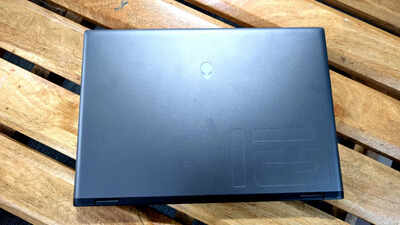
Rating: 4/5
Alienware, a name synonymous with high-performance gaming laptops, has always offered machines with distinctive aesthetics. Over the years, Alienware laptops have become known for their robust build quality, powerful components and customisable lighting, catering to the needs of avid gamers. And as technology evolved and consumer preferences shifted, Alienware laptops too have seen some changes. The latest offering by Dell Technologies, the Alienware m16 R2, illustrates this ‘change’.
Priced starting at Rs 1,49,999, the Alienware m16 R2 packs high-performance hardware and gaming-centric features. The laptop sports a slimmer profile and refined appearance. At the launch, the company said that Alienware m16 R2 has been redesigned based on community feedback, with a 15% smaller footprint, improved airflow, and the new Stealth Mode feature for discreet gaming in various settings. But is it versatile enough for everyday use – we are here to find out.
Design and display
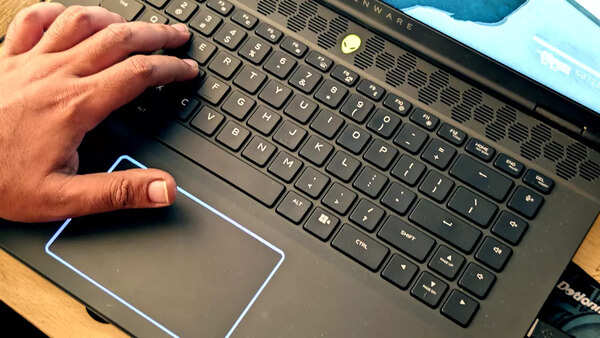
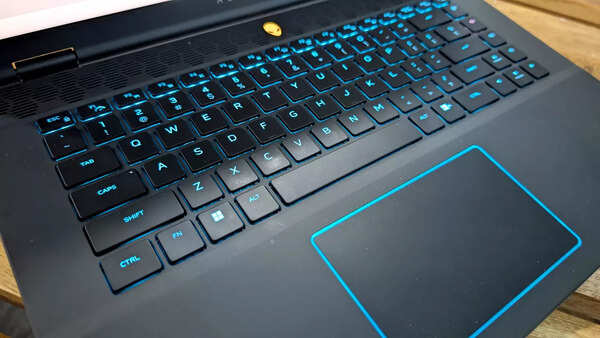
These vents are also just above the keyboard and the Alien head-shaped power button has been moved from the right to the centre. The keyboard of the Alienware m16 R2 supports RGB backlighting, and the keys are soft rubbery-finish. They have good travel distance and feel good while typing. There are soft-finish palm rests on either side of the touchpad, which is surrounded by an LED light. Additionally, we would have liked a larger touchpad.
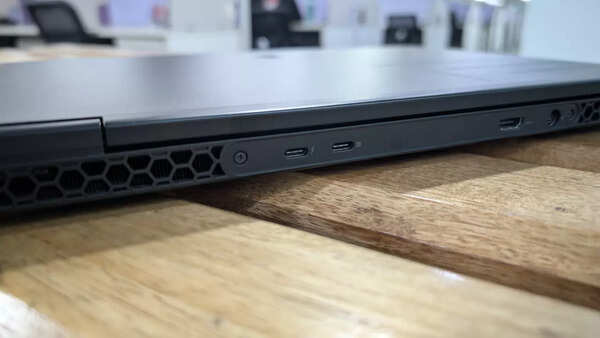
Coming to the ports, the right side sports two USB Type-A ports and a microSD card reader; the right side has an RJ45 Ethernet port and a headphone jack, while the back houses two USB Type-C ports, an HDMI 2.1 port, and a DC port. The hinge on the Alienware m16 R2 has a good open and close feel, and it can be opened to 180 degrees. Overall, the build quality is solid and the laptop weighs 2.6kg.
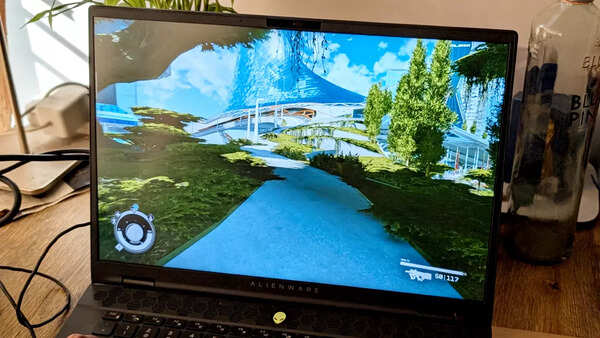
The Alienware m16 R2 sports a 16-inch QHD+ panel with a 240Hz refresh rate, G-Sync, FreeSync, and Dolby Vision HDR support. While these specs look great, it's worth noting that this is an IPS panel, not an OLED that offers better colour reproduction and saves battery life – which shouldn’t be a concern in the case of gaming laptops.
The display's brightness is rated at 300 nits, which can feel a little less bright to some users, especially in well-lit environments. The colours, are punchy but after watching movies on the laptop, we felt that there is a scope for improvement in this regard. Having said that, the display is good enough for gaming and the quality isn’t a deal breaker.
The laptop's dual speakers are sufficiently loud for gaming but if you are looking to use them for other purposes, we were slightly disappointed. There is no bass and the output is basically flat. It is recommended that gamers use headphones for a better experience. Other features include a 1080p webcam with HDR, dual-array microphones and an IR camera for Windows Hello facial recognition that works well in all lightning conditions.
Performance
Our Alienware m16 R2 packed an Intel Core Ultra 9 185H processor, NVIDIA GeForce RTX 4070 graphics card, 32GB RAM and 1TB storage. It runs Windows 11 Home and comes with Alienware tools like Command Center that allows granular controls on the performance, configuring the LED colours and more. There is ‘bloatware’ as such.
The Alienware m16 R2 comes equipped with a "Stealth Mode" that disables the laptop's lighting and aims to give it a more conventional appearance. The company aims to make Alienware suitable for use in professional settings like coffee shops and meeting rooms, not just gaming environments. The Stealth Mode not only silences the fans but also turns off the signature glowing Alienware logo on the back.

When it comes to the core performance, the hardware is able to handle games easily. Since it is also supposed to be used as a daily driver, we tested some video editing software, which ran fine. We played games like Starfield, Forza Horizon 5 and NFS Heat on the laptop. It automatically ran on the highest settings available, delivering a good performance with an average of 90 FPS.
We mentioned that the company removed the thermal shelf to achieve a compact design, essentially reconfiguring the cooling system. We felt that it was not ‘a job well done’. While gaming, the laptop did get noticeably warm, particularly around the WASD keys after a 30-35-minute gaming session. At around the same time, the fans kick in to dispel the heat generated during gaming – particularly when we played Starfield – providing a few more minutes of session.
Despite not being officially branded as a Copilot PC or having a dedicated Copilot key, the Alienware m16 R2's Intel Core Ultra processor, with its built-in NPU, enables it to handle AI tasks effectively through the Copilot chatbot.
Battery
The Alienware m16 R2 comes with a 90Wh battery and a 240W charging adapter. While a full charge takes around 1 hour and 30 minutes, the quick charging feature provides a substantial 60% battery life in around 30 minutes. When gaming on battery power, expect about an hour of playtime for demanding titles and slightly more for less demanding games.
However, when using the laptop in Stealth mode for productivity tasks, the battery lasted around 3 hours, which meant that we had to carry the charger around in our bag. We have been of the view that a gaming laptop’s battery life shouldn’t be a priority when choosing one that suits the needs.
Verdict
The Alienware m16 R2 blends gaming prowess with everyday usability, essentially challenging the conventional image of a bulky and flashy gaming laptop. At a price of 1.5 lakh onwards, the laptop is a well-built machine from both the CPU and GPU perspectives. The display is responsive and the battery life is respectable. The Alienware m16 R2 is a great choice if you're also looking for a gaming laptop that can be used for more than just gaming.
End of Article
Latest Mobiles








FOLLOW US ON SOCIAL MEDIA
Photostories

Hot Picks
TOP TRENDING
Popular Categories
Hot on the Web
Top Trends
Trending Topics
Superfoods For LegsWinter FoodBiggest FruitsGame Changer ReviewGame Changer Movie Release LIVE UpdatesChinese Zodiac SingsWildlife Safari In 2025Naga ChaitanyaBaby John Box Office CollectionPamela AndersonAmit BanerjiChinese New Year 2025Jim Corbet National ParkMaha Kumbh 2025Shark Tank India 4NYT ConnectionsSam AltmanSatya Nadella
Living and entertainment
Latest News
Electric Car Sales in Germany Drop 27.4% in 2024Is onion juice good for stomach ache?Kiara Advani joins Ram Charan for 'Game Changer'Shreya Ghoshal to sing a track in 'Game Changer'; Shares ThamanChicago Med Season 10: All you need to know about the midseason releaseWill Ram Charan's 'Game Changer' have a sequel?Post Office savings accounts: Check new paperless KYC, Aadhaar authentication processRam Charan's 'Game Changer' teaser release date is HERE; Find out'Game Changer' makers to drop major update on Ganesh Chaturthi: reportsRam Charan's 'Game Changer' begins dubbing workCBSE Board Exam 2025: How to download admit card once releaseRam Charan's 'Game Changer': What fans can expectSukumar calls Ram Charan's performance in 'Game Changer' National Award worthy2025 Bajaj Pulsar RS 200 launched in India at Rs 1.84 lakh: Here’s what’s newWatch: Rabri Wale Baba continues his spiritual journey by serving 'sweet blessings' to Maha Kumbh pilgrimsJohnny Depp's daughter Lily-Rose Depp on Nosferatu: 'This movie feels very real, visceral, and human'MI ace Trent Boult vows 'plenty more to come' after double-wicket maiden in SA20 openerShekhar Kapur: Every day I hear cinema industry is dying, I never believe it
Copyright © 2025 Bennett, Coleman & Co. Ltd. All rights reserved. For reprint rights: Times Syndication Service